Pay with Crypto
How it works
Click to buy cryptocurrency
Buy ETH (Ethereum) right in MetaMask - about $15 plus a little extra for the network fee.
Choose a payment method
Card, Apple Pay, Google Pay, PayPal, bank transfer and more - use any method available in your country.
Send your payment
Send the exact amount shown in the payment window. Your code arrives on the page automatically.
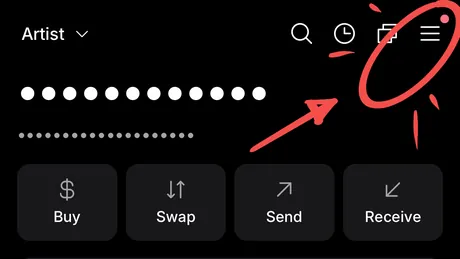
Open your MetaMask wallet
Install MetaMask on your phone or in your browser (Trust Wallet, Coinbase Wallet and other Ethereum wallets work too), open it and tap the menu ≡ in the top corner.
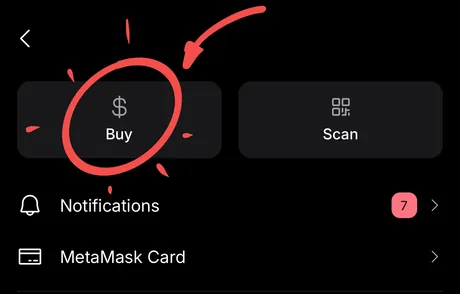
Tap Buy
Buy crypto right in the app with a card, Apple Pay, Google Pay, PayPal or bank transfer.
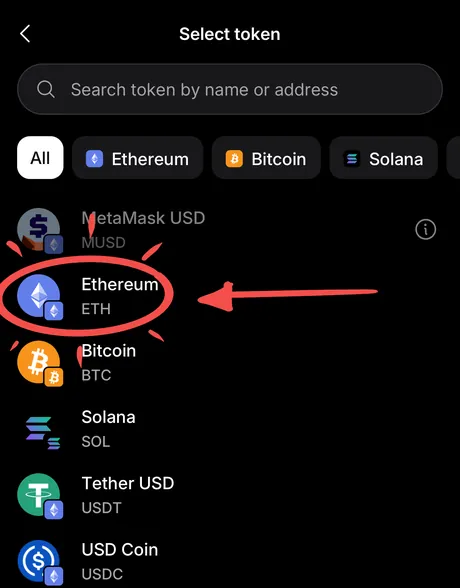
Choose Ethereum (ETH)
Pick Ethereum (ETH) in the list of tokens - this is what you will pay with.
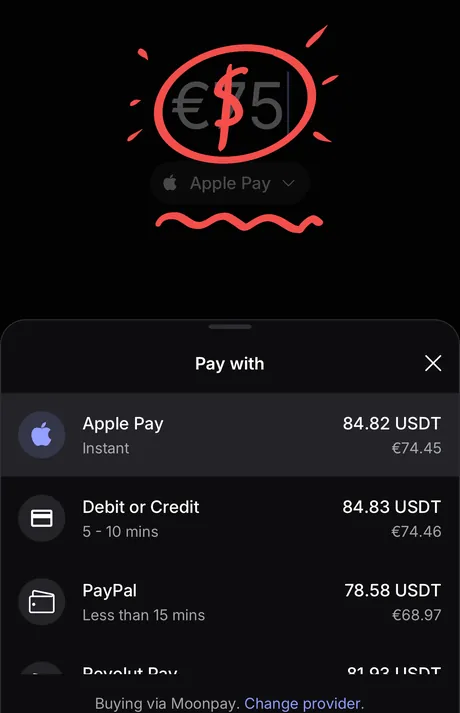
Enter $15 - or a bit more
Type the amount in dollars and pick the provider available in your country. Take a little extra ETH: the network fee is added when you send, and MetaMask shows it before you confirm.
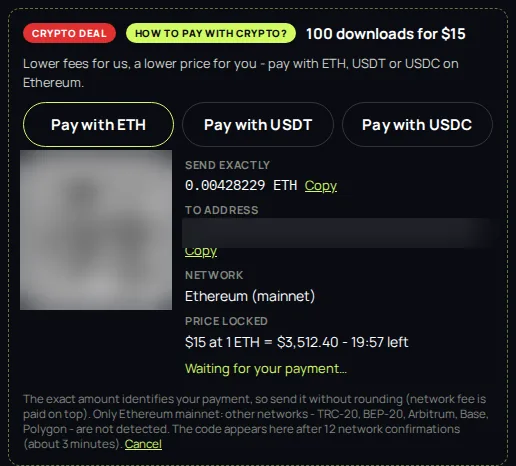
Get your exact amount
On music-promo.com master your track, click Download and in the Crypto deal block tap Pay with ETH. The payment window shows the exact amount, our address and a QR code. The price is locked for 20 minutes - keep this tab open.
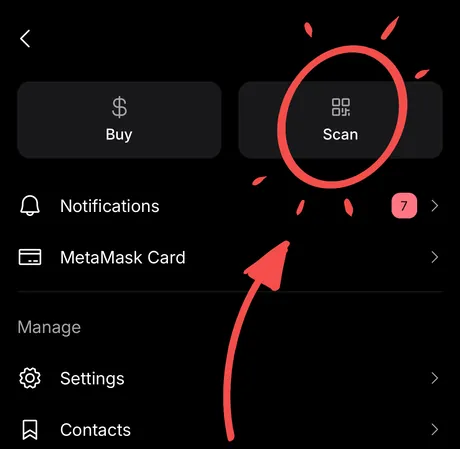
Scan the QR code
In MetaMask open the menu, tap Scan and point the camera at the QR code in the payment window - our address and the exact amount fill in automatically. Check them and confirm.
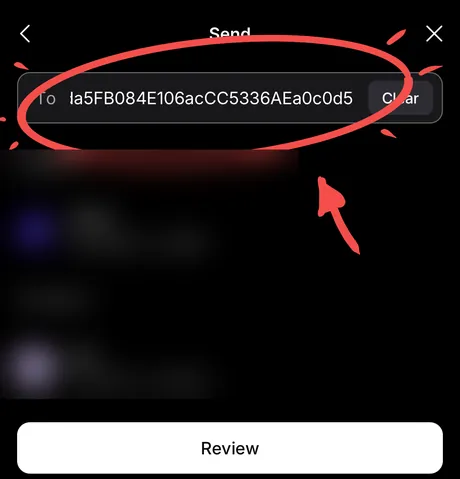
Or send it manually
Tap Send, paste our address from the payment window, select ETH, enter the amount exactly, with all decimals, tap Review and confirm. After 12 confirmations - about 3 minutes - your code for 100 downloads appears on the page and the download starts by itself.
You can also pay with USDT or USDC on Ethereum
Buy USDT or USDC on the Ethereum network (ERC-20) instead of ETH and choose Pay with USDT or Pay with USDC in the payment window - the steps are the same. Keep a few dollars of ETH in your wallet too: the network fee is always paid in ETH.
Before you send
- Network: Ethereum mainnet only. TRC-20, BEP-20, Polygon, Arbitrum, Base and other networks are not detected.
- Send the exact amount from the payment window, with all decimals. The network fee is paid on top.
- Send within 20 minutes - the ETH price is locked for that time.
- Only send to the address shown in the payment window on music-promo.com.
You can also buy ETH on large global platforms available in most countries and withdraw it to your wallet on the Ethereum network. They make it easy to buy and transfer crypto through a website or mobile app.
ETH on Ethereum mainnet - and also USDT or USDC on Ethereum (ERC-20). Transfers on other networks - TRC-20 (Tron), BEP-20 (BNB Chain), Polygon, Arbitrum, Base, Optimism, Solana - are not detected automatically. If you picked the wrong network by mistake, write to us with the transaction hash.
When you choose ETH, we convert the package price in dollars to ETH at the current market rate and lock it for 20 minutes - the page shows the rate and a countdown. Send the payment within that time. If the time runs out, just start a new payment to get a fresh price. A payment sent in time is accepted even if it confirms a little later.
Every order gets a unique amount. That is how we recognise your payment among all transfers to our wallet - no account or email needed. Send exactly the amount shown; the network fee is paid on top and does not change it.
It is possible, but a personal wallet is more reliable. When withdrawing from an exchange choose the Ethereum (ERC-20) network and make sure we receive the exact amount: some exchanges deduct the withdrawal fee from the amount, and then the payment is not matched automatically. Exchange withdrawals can also take longer than the 20-minute price window.
Do not pay again. Check the transaction on etherscan.io: while it is pending, just wait - the code appears after 12 confirmations. If you sent a different amount, used another network or closed the page, email info@music-promo.com with the transaction hash (it starts with 0x) and we will issue your code manually.
This usually happens when the network fee was set too low or the ETH balance is not enough. In MetaMask open the pending transaction and use Speed up, or top up ETH and try again. See the MetaMask help center for details.
You send the payment yourself from your own wallet; we never see your card, bank details or wallet keys. Only send to the address shown in the payment window on music-promo.com, and never share your Secret Recovery Phrase with anyone.
Got a question or an idea?
Drop us a line.
Questions and suggestions: info@music-promo.com